Gateway API
The Kubernetes Gateway API is the next generation of Kubernetes Ingress, Load Balancing, and Service Mesh APIs — intended as a more expressive, role-oriented successor to Ingress and OpenShift Route objects.
It separates concerns across three roles:
| Role | Resource | Who manages it |
|---|---|---|
| Infrastructure Provider | GatewayClass |
Cluster admin / cloud provider |
| Cluster Operator | Gateway |
Platform team |
| Application Developer | HTTPRoute / GRPCRoute / … |
App team |
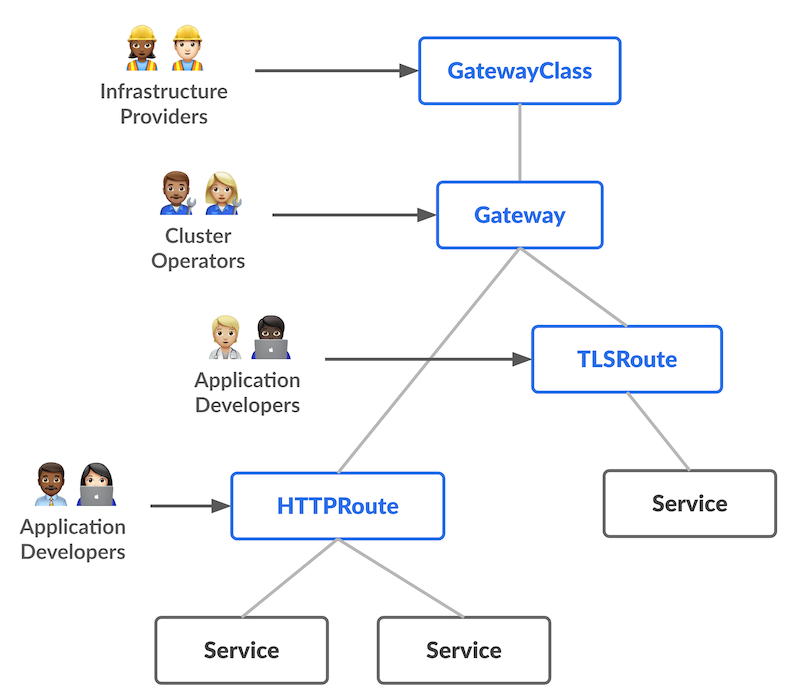
Official documentation:
- OpenShift — Gateway API — including how to enable Gateway API on your cluster
- Kubernetes Gateway API
Red Hat Connectivity Link Tutorial
For a full end-to-end walkthrough covering TLS automation, OIDC auth, rate limiting, and observability on top of Gateway API, check out Nikolaus Lemberski's
Connectivity Link 1.3 Tutorial.
It uses Red Hat Connectivity Link (based on Kuadrant) to add TLSPolicy, AuthPolicy, and RateLimitPolicy on top of the Gateway API resources shown on this page.
Tested with:
| Component | Version |
|---|---|
| OpenShift | v4.22.5 |
Create GatewayClass
| GatewayClass | |
|---|---|
Create Gateway
Requires LoadBalancer service support
Creating a Gateway provisions a Kubernetes service of type LoadBalancer.
On-premise clusters need MetalLB installed and configured — see
On-premise gateway routing requirements.
RFE-8640 — "Support self-provisioned load balancers for Gateway API"
Create a TLS secret for the Gateway:
| Create TLS secret | |
|---|---|
DNS setup
The wildcard hostname defined in the Gateway must have a DNS A record pointing to the external IP of the LoadBalancer service:
If you use the External DNS Operator, the LoadBalancer service already carries the annotation for automatic DNS provisioning:
| External DNS annotation | |
|---|---|
Otherwise, create the DNS record manually:
See also: Configuring DNS for on-premise gateways
Basic HTTPRoute example
Exposes a simple workload through the Gateway via an HTTPRoute.
Deploy the workload
Attach an HTTPRoute
Verify the route is Accepted:
Both HTTP and HTTPS work, but the backend always responds via plain HTTP — the Gateway terminates TLS and forwards unencrypted traffic to the pod.
Re-encrypt termination with BackendTLSPolicy
To encrypt traffic between the Gateway and the backend, use a BackendTLSPolicy.
See: Configuring re-encrypt termination with a BackendTLSPolicy
Known limitation: CA certificate key name mismatch
The BackendTLSPolicy spec requires the CA certificate in a ConfigMap key named exactly ca.crt. OpenShift's service-ca operator injects certificates with key service-ca.crt, and the trusted CA bundle injector uses ca-bundle.crt. Neither matches what BackendTLSPolicy expects.
Tracking issues and proposed solutions
Active RFEs / Tracking Issues
- RFE-9174 — "CA Bundle Key Name Flexibility" — Approved, Priority: Critical. Primary RFE requesting configurable CA bundle key names for interop between OpenShift CA injection and
BackendTLSPolicy. - OCPSTRAT-3459 — "CA Bundle Key Name Flexibility" — New, Priority: Critical. Strategic tracking issue under Networking, created July 2026.
- RFE-8361 — "Setting the Gateway API controller to mount openshift-service-ca.crt" — Backlog. Original customer-filed RFE from October 2025.
- gateway-api#4196 — Upstream feature request to support custom certificate key names.
Potential solutions being evaluated (from OCPSTRAT-3459)
- Upstream Gateway API change — Allow the gateway controller to accept a configurable key name
- Add service CA to the default trust bundle — No per-resource configuration needed
- Use
ClusterTrustBundle— Newer Kubernetes API, requires k8s 1.37+ - Fallback-to-first-cert-in-configmap — Gateway controller uses the first certificate found regardless of key name
- OpenShift service-ca-operator change — Allow configuring the injected key name so it can inject as
ca.crt
Workaround: create a ConfigMap with the correct key
Create a ConfigMap that copies the service CA content into a key named ca.crt:
Warning
This ConfigMap will not auto-rotate when the service CA is renewed. You need external tooling (custom controller, CronJob, or GitOps template) to keep it in sync. Watch out for x509 formatting issues — trailing newlines or whitespace can cause certificate validation failures.
Apply the BackendTLSPolicy
Update the HTTPRoute for HTTPS backend
Change the backend port from 8080 to 8443:
HTTPS work, and the backend always responds via HTTPS — the Gateway terminates TLS and forwards encrypted traffic to the pod.
Troubleshooting
Dump Envoy config
Dump all endpoints
Forward the Envoy admin port:
List endpoints (filtered by namespace):
Filter by a specific cluster name:
